Order sync
Synchronise WooCommerce orders with the Wappbiz API.



E-commerce & CMS · Official WhatsApp Business API
The Wappbiz plugin for WordPress connects your WooCommerce store to the Wappbiz API, so order, status and cart updates reach customers on WhatsApp in real time.
The Wappbiz plugin, published in the WordPress plugin directory, synchronises WooCommerce orders and cart updates with the Wappbiz API and sends real-time WhatsApp notifications.
What you can dowith WordPress and WhatsApp.
Synchronise WooCommerce orders with the Wappbiz API.
Send real-time WhatsApp notifications when items are added to or updated in the cart.
Keep customers informed at every stage, such as processing, shipped or completed.
Supports WooCommerce multi-vendor marketplaces built with WCFM.
Enable or disable order creation, order status and cart update events.
Connect WordPressin 4 simple steps.
In your WordPress admin, go to Plugins > Add New, search for “Wappbiz”, or upload the plugin manually.
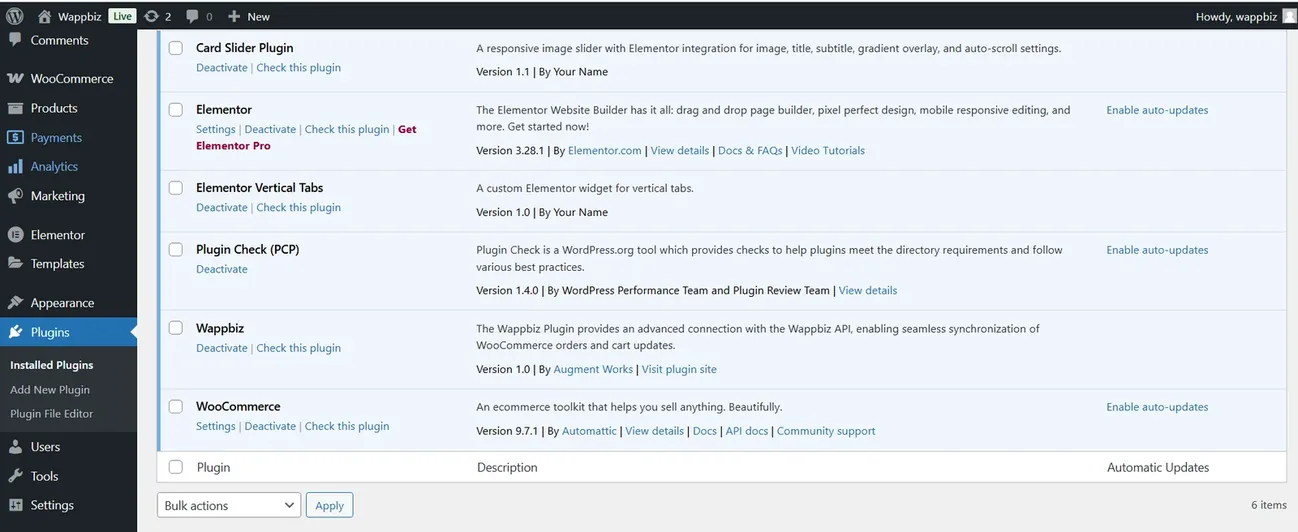
Activate Wappbiz from the Plugins menu in WordPress.
Open the Wappbiz menu in WordPress, paste the API details from your Wappbiz dashboard and save the settings.
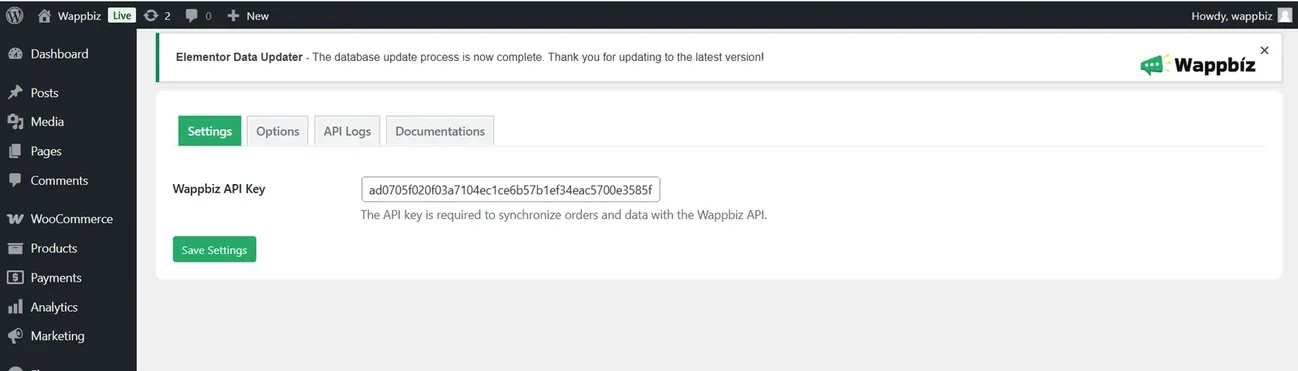
Enable the events you want: order creation, order status updates and cart updates.
WordPress is connected. Start messaging customers from Wappbiz.
Add a customizable WhatsApp chat button to your website and create QR codes for offline enquiries.
ExploreBulk Message & BroadcastSend WhatsApp broadcast messages to 1000+ customers instantly.
ExploreDrip CampaignsUse Wappbiz to run a WhatsApp Drip Campaign, automate follow-ups, and nurture leads with scheduled, personalized messages—no manual work needed.
ExploreYes. The Wappbiz plugin is available in the WordPress plugin directory.
It synchronises WooCommerce orders and cart updates with the Wappbiz API and sends real-time WhatsApp notifications for orders, status changes and cart updates.
Yes. The plugin needs your Wappbiz API details, which you get from your Wappbiz dashboard.
Yes. You can enable or disable order creation, order status updates and cart updates.
Yes. It supports WooCommerce multi-vendor marketplaces built with WCFM.










Your next customeris already typing.
Put an AI agent on WhatsApp, Instagram and Messenger today.